Pane
decision-tree
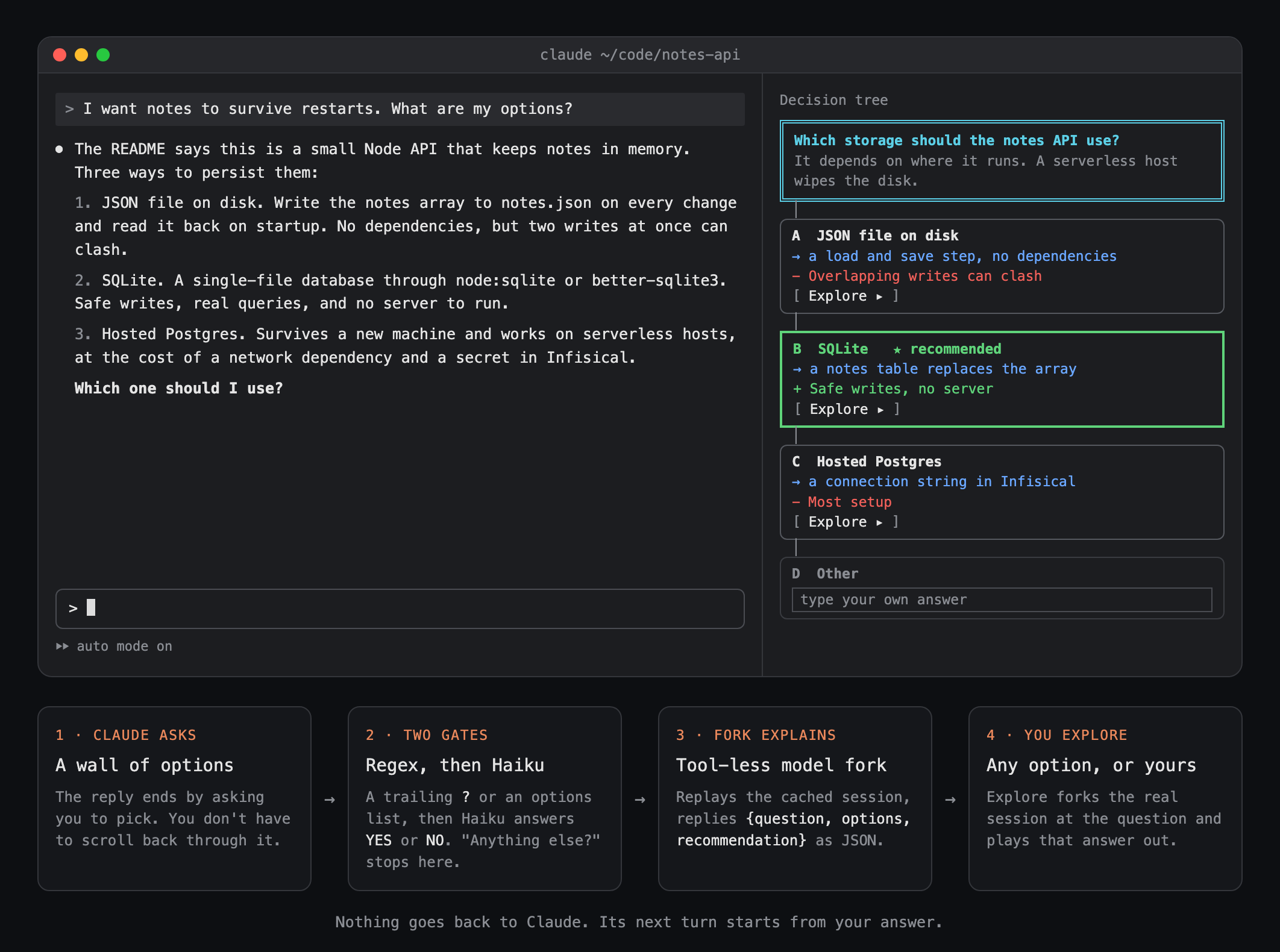
When Claude ends a reply with a question, a side pane lays out every option and lets you try any answer in a forked session.
What it does
decision-tree turns the question at the end of Claude's reply into a side pane you can explore: every option with what it leads to, and a real forked session for any answer you want to try before you commit.
After every turn it runs four steps:
- A regex looks at the end of the reply. A question mark in the last paragraph, or two or more numbered or lettered options. Most turns stop here, with no model call.
- Haiku confirms it. It answers
YESif you have to decide something before work can go on,NOfor "anything else?" and other pleasantries. - A fork explains the choice. It replays the session's own transcript, served from the prompt cache, so it knows everything Claude knew. It has no tools and replies with JSON: the question, the context you need, each option with what it leads to and its pros and cons, and a recommendation.
- The pane draws it. One box per option, the recommended one in green, and an Explore button on each. The last box is Other: type your own answer and press Enter.
You still answer Claude in the prompt as usual. Nothing in the pane goes back to Claude.
Exploring
Explore forks the real session at the message that asked the question, using claude -p with --resume, --resume-session-at and --fork-session. The fork is told you picked that option and carries on with read-only tools (Read, Grep, Glob). In 12 to 20 seconds the pane shows what it would do, its steps, and the next question it would ask you. Explore again from there to go deeper: each level forks the branch above it.
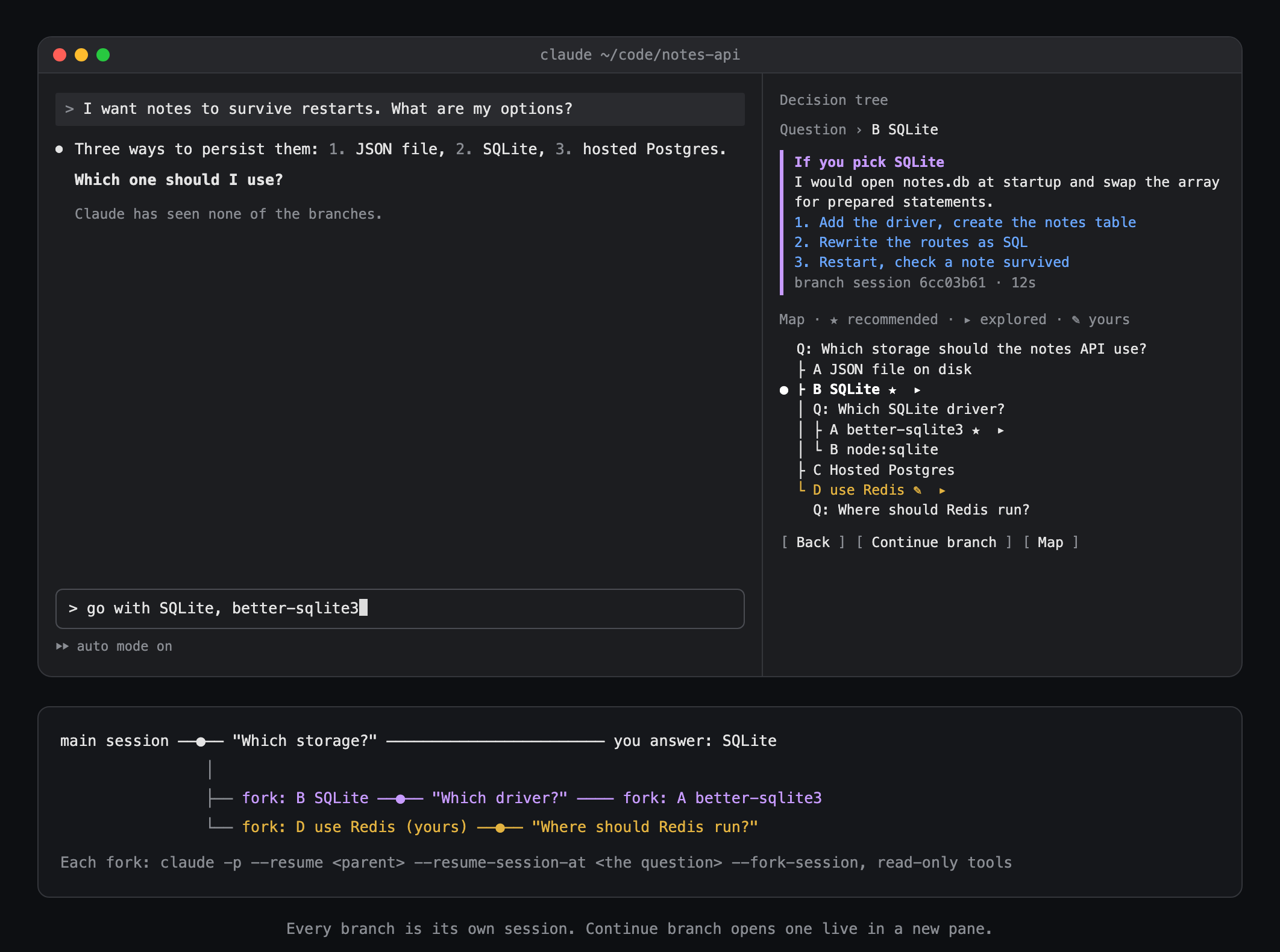
- Your own answer: the Other box, or
/explain other <answer>, adds it as an option and explores it like the rest. - Map: every question and option you explored as one tree. Press a row to jump to it.
- Continue branch: opens the branch as a live session with
claude --resume <branch> --fork-session, in a new Herdr pane when you're inside Herdr, or copied to your clipboard otherwise.
Every branch is its own session file, so the main conversation never sees any of it.
Commands
/explain: open the pane for the latest question./explain b: explore option B (A to H)./explain other <answer>: explore your own answer./explain map: show the map./explain back,/explain top: move up the tree./explain continue: open the current branch as a live session.
Settings
gateModel(haiku): the model that answersYESorNO.
Limits
- Claude Code only opens a pane nobody asked for in a terminal at least 144 columns wide. In a narrower one you get a toast. Run
/explainand the pane opens above the prompt. - The tree lives in the mod's memory. A new question, a restart or a reload clears it. The branch sessions stay on disk and can still be resumed by id.
--resume-session-atis an undocumented Claude Code flag (tested on 2.1.296). If the mod can't find the message to cut at, it forks from the latest point and says so.- Each branch is a full
claude -prun with a turn's cost, and its session file stays in the project's history.