Tooling
A checkout each
Two agents, one working tree, and a stash you did not ask for. The second agent did nothing wrong. It just started.
 Ray Amjad
On this page
The first time you run two agents on one repo, it looks like it works.
Then one of them switches branch to check something. The other is now writing its feature into the wrong branch, and the test run you were watching is testing a mixture of both.
The working tree is shared mutable state
That is the whole bug. Two writers, one directory, no lock.
Every symptom comes out of that one sentence: the edit that vanished, the stash you did not make, the suite that fails on code neither agent wrote. You do not fix it with better prompts. You fix it by removing the sharing.
One directory per branch
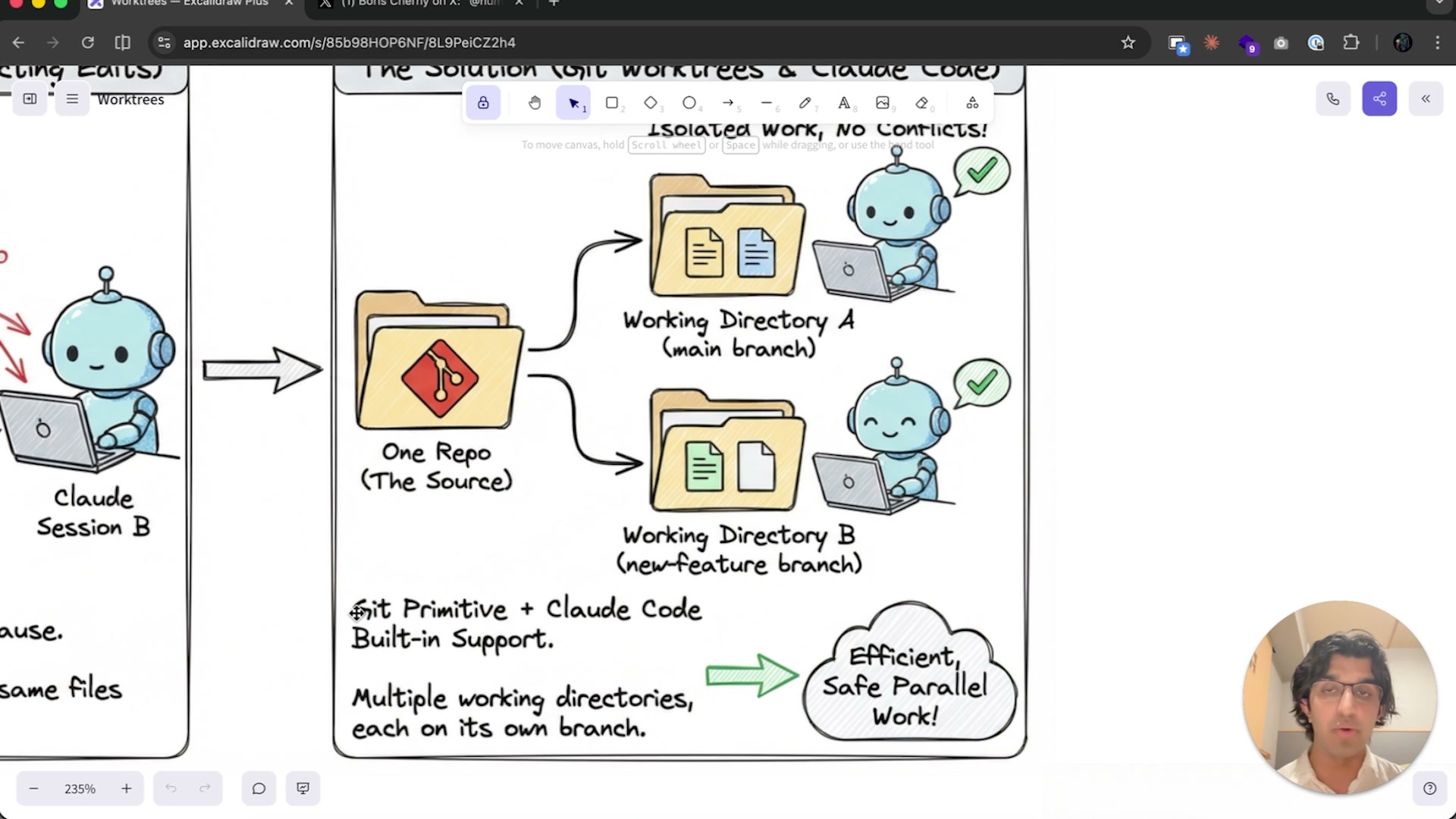
git worktree add gives each agent its own path on disk, on its own branch,
backed by the same repository. One clone of the history, many working trees. An
agent in one tree cannot see, move or stash anything in another.
The change in how you work is larger than the change in the command. You can read a finished diff in one tree while a second agent is still mid-task in another. You stop serialising yourself.
What actually bites
Untracked files do not travel. node_modules, your .env, build caches — the
new tree has none of them, and the agent's first act is a confusing failure.
Decide once whether you copy, symlink or install per tree, and put the answer
in a script.
Then clean up. git worktree list grows quietly, and a stale tree is a branch
you will forget you had. Disk is cheap. A lost afternoon is not.
Transcript
Okay, now let's talk about work trees within side of cloud code. Now, many people like to have many sessions of CLAUDE code running at the same time in the same folder. So you may have one session, such as on the left hand side that I have, making refactors to the code base. Another session could be like changing some components of the landing page, and then you may have another session making some other edits at the same time as well. Many people like having three, four, five sessions running in the same project. And the problem that can happen here is that each version of cloud code assumes that it is the the only version that is making changes to that particular folder. And this can be fine in instances when they're working on completely different parts of the code base. So for example, you may have one just like writing up some documentation and another one would be making changes to a landing page. Those are two completely different parts of the code base that don't really overlap in any way. It's not a problem to have two sessions running at the same time in the same folder, but you may have many situations where both sessions may be overlapping in terms of there's a couple files that they both may need to edit. So for example, if they're making styling related changes, then session A of cloud code could edit the style CSS and then session B of Claude code in NovaSession may also edit it, and then it may accidentally undo something that session A did, or it may accidentally rewrite something session A did. And it can lead to a lot more confusion happening. Essentially when you have two different agents touching these same files, then that leads to much more potential mess happening and problems happening down the line and just random bugs being introduced. So essentially you want to be isolating the work of each instance of cloud code. And one of the ways that you can do this is with work trees. Now, work Trees is an idea from Git whereby you can have multiple branches checked out at the same time and they both stay isolated from one another. And this isolation is very similar to if I just went to a project such as VidTempla and then I copy this project and called it something like vidtempla, I don't know, feature X and then run a separate instance of CLAUDE code inside of that. So if you use this, then each session of CLAUDE code is essentially working inside of a different folder, which means that if it makes a lot of edits or a lot of refactors, then it's much safer because it doesn't end up undoing any Work that another instance of claude code ends up doing. Now, to quickly show you what it looks like, if you do claude worktree and then give it a name so the work tree may be called landing pageredesign.
I can then press Enter, then you can see the folder path. Up here is desktop and then my project and then claude worktree's landing page redesign. And if I went over to that folder so AgentStack Claude work trees, landing page redesign, then you would see a copy of everything that was in the main folder right over here. So essentially behind the scenes claude code just did a copy of all the main files except for some files such as the node modules or the env file. So then I can start working in this session of claude code and say can you come up with a brand new fresh redesign of the landing page and then also use the front end redesign skill as well and then launch it for me so I can see what it looks like. Then that can get started by redesigning the landing page a tiny bit and then on the left hand side we can continue making changes. And if one of those changes edits to the landing page, then it would be completely safe. So I'll wait until this is finished over here.
But essentially what many people like doing is spinning up an isolated work tree every time they work on a brand new feature of claude code. For example, if they were doing bug fixes, updating documentation or something, they would just split the window again for their terminal and then they would run another session of claude code. So they would do claude worktree and then call it whatever they want to do like login refactor. And essentially when you are using work tree, if changes were made to files within that work tree, then that work tree will stay like it will ask you if you want to delete the work tree when you're exiting out of it. But if you don't make any changes to work tree. So for example, on the right hand side if I just said hi and then did exit or quit out of claude code, then it would automatically delete that work tree, which was a login refactor one. So if I went to AgentStack Claude worktrees, then you would see the login refactor one has been deleted because no changes happened to it. But on the right hand side can you make the landing page dark theme for the application? And you can see on the right hand side over here it finally updated a file. So if I stopped it and did exit, then it would ask me do I want to keep the work tree over here or do I want to delete it? And the option of deleting it can be really handy because it basically means that your changes have been isolated and if you didn't feel like the changes were particularly good, then you're deleting it and nothing else was changed in the code base. It's really easy to undo quick changes or quick ideas that you had. So in this case I'm going to do remove work tree and you will see from here landing page B will be deleted. So that is one of the powerful parts about work trees. Some people like having every single feature in a work tree or sometimes for a feature that they're kind of unsure on whether they want to actually include in the application, they can have all those changes be happening in a work tree and then if they're happy with it, then they can keep it and merge it into the main application. And if they're not happy with it, then they can delete those changes really easily. Anyway, our work tree on the left hand side over here has been completed where I told it with the front end design skill to redesign the application. And it came up with this design over here, which honestly, whilst it is fancy, it looks really bad. But let's imagine that I actually wanted to keep this design. If I did exit, then it would ask me if I want to delete the work tree or keep it. But if I want to actually keep the changes and have them on the live website, then what I would need to do is open up a pull request into the main application. So when you do this, you can basically just tell Claud code, hey, can you open up a pull request into the main application, the main branch for me? And then it would essentially know, okay, I need to commit these changes and then open up that pull request. Okay, so you can see that it created that pull request over here. And then if I go to GitHub, I can see this is what it looks like from work tree landing page redesign. And then it wrote all of this out for me and either I can merge it in or I can delete it. So in this case, instead of doing squash and merge, because I don't want these changes, I will do close pull request, then I will do exit out of here and then delete that work tree. So if you ran a session of Claude code normally without specifying a work tree, then I can also have parallel cloud code sub agents, each operating within its own work tree. So I could say to Claude code something like, spin up three different subagents that will work in their own work tree and make a brand new version of the landing page by rearranging the elements into a new layout and also adding new copy below the main copy. If I said something like this and mentioned in their own work tree, then claude code will find the landing page and then have three subagents working independently from one another. So this can be really great because one subagent will not be influenced by what another subagent is doing. I can have multiple variations of something happening at the same time for me. So you can see that it found the landing page over here and then it will spin up three sub agents. So you can see the first one is doing landing page variation A and this is a work tree that it made right over here with the agent id. Then we have our second agent over here and now we have our third one.
Now when it comes to deciding whether subagent work trees are worth it or not, Boris Cherney, who is a creator of cloud code, said on Twitter personally I've been finding subvision work trees useful for one shotting large batch changes like codebase wide code migrations. Previously these would have to be a single plan less well executed. A RALPH loop does not always work a custom harness with agent SDK in Python loop, more code or a team instead I don't use Worktree as much, and by Worktree he's referring to Claw Worktree that we talked about earlier.
But the team is split 5050 with half using work trees, half preferring multiple git checkouts or multiple tabs in a desktop app. So essentially when you're doing a big migration, having edits happening one after another can be really slow and fragile, especially as a context window is getting filled up. Because claude code when doing a really big migration it may do the earlier parts of the migration really well and then the later parts as a context window fills up like less well.
But by telling cloud code to basically different parts of the migration, splitting up a big job into different work trees, you can then merge each work tree into the main branch separately and then also review each one separately as well. So let me go for a quick example of that. So I can go to Claude without the work tree, tag this one over here, I'll do dangerously skip permissions this time and then say can you basically come up with a plan for migrating from TRPC version 10 to version 11? And I'll actually copy over this entire document for cloud code because this should be handy. So command A, command c, command v, press enter and whilst we're waiting for this plan to complete. We can go back to the previous task where it was designing three different versions of the landing page inside of subagents. I can see that each of the subagents have been completed in their own work tree. Then I can say, can you launch all of them in Chrome? So it basically launched all three work trees for me, which means if I go to Chrome, it looks kind of like this. So this is the subagent one, what it did in isolation.
This is sub agent two. This looks pretty good, honestly. And then this is Sub Agent 3 right over here. So we basically got three different versions of our landing page happening in three different work trees and the ability to quickly dispose of any ones that I don't think are good. Now the benefit we got here is like parallelization, because we managed to make three different landing pages at the same time. And secondly we got safety because they, they all weren't trying to edit the same file because they were isolated on different work trees. So we can delete landing page two and landing page three, because that doesn't look good. And then say can you delete landing page B and C and then open a pull request to merge landing page A into the main branch? Anyways, we can now see that the migration plan is right over here and I can then tell it claude code. Can you implement this by splitting up into subagents in isolated work trees in like sizable chunks and then press enter. And because it's making changes across like 30 different files, it should be done faster within set of subagents and the subagents would not be like conflicting with one another and you would reduce the likelihood that those subagents are like interfering with one another by editing the same files. Now you don't always want to be using work trees within side of subagents. You want to consider to yourself, do these subagents need to collaborate with one another? And if so, it may be better for them to be inside of an agent team so they can send messages back and forth and see changes that other sub agents are making inside of that team.
So in the case of agent teams, the problem is coordination. The agents need to coordinate with one another to achieve a better result and not file conflicts. So if you're splitting any work into isolated work trees with some agents, then the work is much harder to achieve because the subagents can't see what the other sub agents are changing and doing. But where work trees are helpful are for truly independent work streams. So if you're making five independent versions of a landing page or component or a UI dashboard. Or if you're doing a lot of migrations from the code base, you can basically have each module of your application being migrated in its own isolated work tree. And the benefit here is that when they are being reviewed inside of a pull request, then each one is being reviewed independently from one another. And if you notice that one of the modules was not refactored properly, then you could just delete that particular work tree and then try that again in a different way, rather than having to delete everything instead. So a lot of the changes are self contained and isolated, which makes it ideal for stuff like refactors. Now, there are some trade offs, the first of which is because each work tree is essentially a clone of the entire code base, it means that that can end up taking a lot of space really quickly if your code base is really big. Next is that for each work tree, they don't have the node modules and other ignored files in the gitignore copied over. So if I went to this work tree folder, you can see that there are no node modules, which means that you would need to set up a system for claude to automatically set up those node modules for you each time a work tree is created. And there are two ways that you can do this. First of all, you can make a brand new file and call it worktree include so dot worktree include over here.
And then you can write in any things that you want copied over into any work tree. So that could include your environment variables like nodemodules as well. And then if you decided to open up a brand new work tree such as feature A, then you will notice that that node modules will also be copied over to the work tree, but it may end up taking longer to copy everything over because the node modules is particularly big. So node modules has been copied over here. And another way is to get claude code to use a work tree create hook. You can watch my previous video about hooks as well, but essentially you can then get claude code to copy over any folders, because if you have the hook set, then the worktree include file is ignored. And then you can also do other stuff like after the files have been copied over, you can have that work tree run the server locally. But do watch the video about hooks and you can get claud code to write the hook for you. Depending on the behavior that you want next up you can have merge conflicts. And also because different subagents, if they require coordination, they could end up doing things differently, which can lead to problems further down the line. Now, for me personally, when I know that I have distinct changes happening in distinct parts of the code base that don't overlap, such as one happening in the backend somewhere and another one being like a button change, then I basically don't use work trees. But when I have some changes that may overlap in some way, then I would stick more towards using work trees, especially if the changes are bigger changes. Some people like to have claude code running on a cloud virtual environment, whether that be like the claude code web version where it runs on anthropic servers, or they have their own cloud environment or something like that.
And then they just don't use work trees because each time a task runs, then it's already isolated anyway, which means that if you're working on multiple features at the same time, you. You don't have to worry about conflicts. So anyway, just wrapping up. If you want to define a claude code work tree, you can do claude worktree give it a name. The short form of doing this is claud w with the name and if you just run claude worktree, then it will auto generate a name for you. Each folder is its own isolated directory inside of a claude work trees inside of your repository, and that session works in complete isolation with no impact on the main branch, the main repo. And when the session ends, if no changes have happened, then it will automatically clean up. But if changes have happened, then it will ask you whether you want to keep the work tree or delete it. And you can delete it if you opened up a pull request to like the main branch. Sub agents can also work in their own work trees, and you can tell claud code to either spawn up a sub agent in its own work tree or inside of the front matter on the subagent. You can specify isolation colon worktree and finally to copy over important things to work tree like ENV or nodemodules, you can either use the worktree include command with a list of files to copy over, or you can create a hook to copy those files over and then do additional things such as doing NPM installed or setting up docker, or like running a database and running the environment locally. Which basically means that whenever a work tree is created, you have a brand new environment for each feature and that you have running locally.
And then with the work tree remove, you can do stuff like deleting the docker containers and the database that may have been created for that work tree, and then deleting any other files too. Anyways, you can see that earlier the four overlapping work tree agents made those changes. So we can then, say, spin up a pull request for each of those changes into the main branch. Then I can see that each of them tackles a different part of the code base for this refactor that we
Get the next one
One email when something new goes up. No drip sequence, and nothing you have to unsubscribe from twice.